What Zero-Knowledge Backup Means and Why It Matters
Zero-knowledge backup means files are encrypted before they leave your device, and the backup service does not need access to readable file contents.
What Zero-Knowledge Backup Means and Why It Matters
Backup software handles sensitive data by design. Personal documents, business files, financial records, source code, photos, and identity documents can all end up inside a backup set.
That makes the security model important. It is not enough for backup storage to be convenient. A careful user should ask who can read the backed-up data, where encryption happens, and what happens if a storage provider or backup service account is compromised.
Zero-knowledge backup is one answer to that question.
In practical terms, zero-knowledge backup means files are encrypted before they leave your device, and the backup provider does not need the ability to read your file contents. The storage provider receives encrypted data. The service moves or manages encrypted backup data without becoming the owner of readable files.
Encryption Should Happen On The Device
The most important detail is where encryption happens.
If files are uploaded in readable form and encrypted later by a server, the server has a moment where it can see the data. That may still be acceptable for some products, but it is not the strongest privacy model.
With client-side encryption, the file is encrypted on the user's device before upload. The backup service and storage provider should only receive encrypted chunks, encrypted metadata, or other protected records.
CloudLess is designed around this client-side model. The app prepares encrypted backup data locally, then sends protected data to storage the user controls.
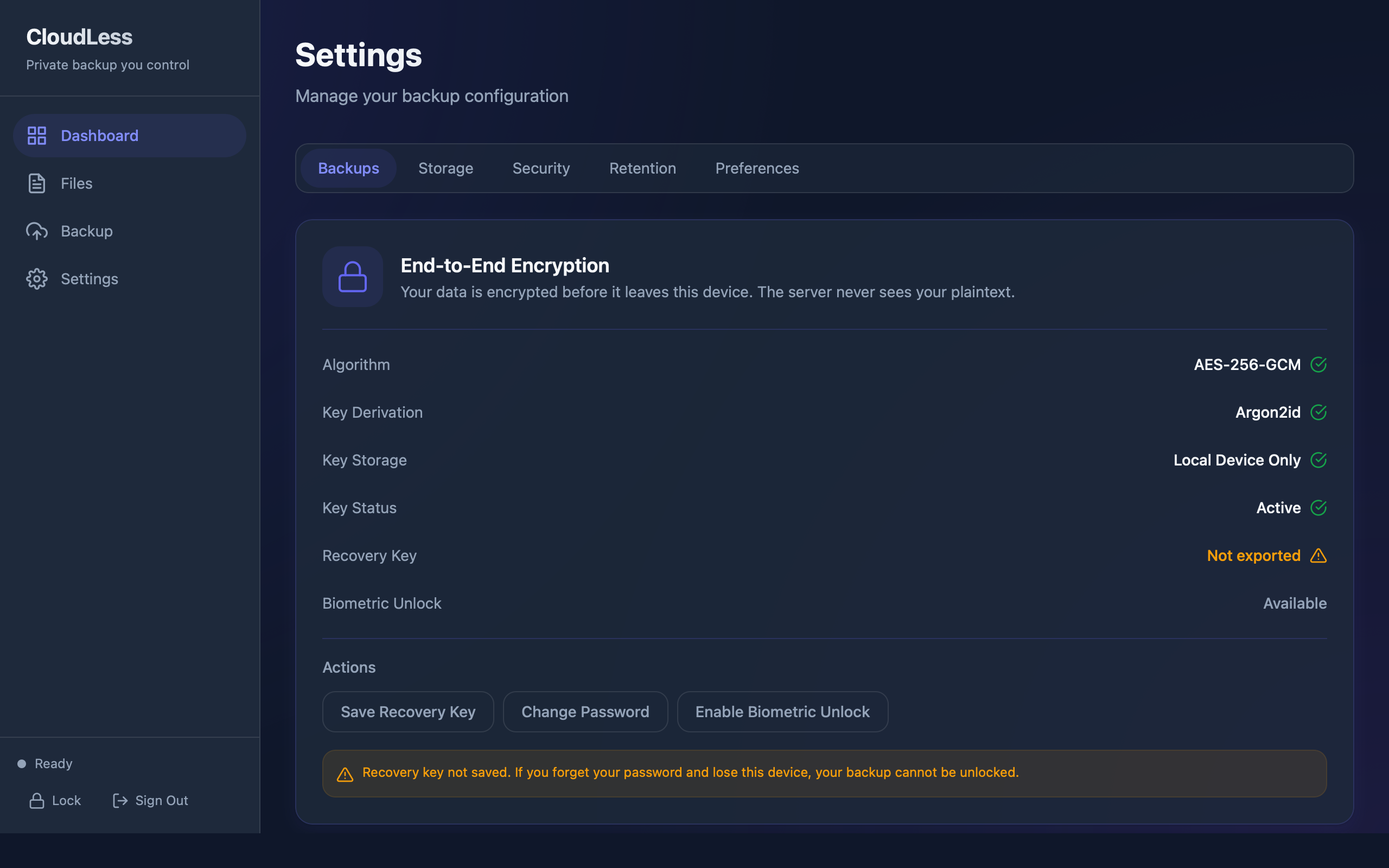
The product exposes encryption as a visible part of setup and settings because it is part of the trust model, not a hidden implementation detail.
Keys Matter More Than Marketing Terms
The phrase zero-knowledge can be used loosely. The practical question is key control.
If a provider can reset your encryption password and still read your old files, the provider likely has access to key material. If support staff can recover readable backups without your secret, the provider has a recovery path into the data. If file names, folder names, or metadata remain readable, some private information may still leak even when file contents are encrypted.
Good backup security should be specific:
- What is encrypted?
- Where are keys created?
- Where are keys stored?
- Can the provider decrypt without the user?
- What recovery material does the user need?
- What metadata remains visible?
CloudLess uses the user's encryption setup to protect backup data before it leaves the device. The goal is to avoid CloudLess becoming the custodian of readable files.
What Storage Providers Should See
When using your own storage, such as an S3-compatible bucket, Google Drive, OneDrive, or SFTP server, the storage provider's job is durability and availability. It should store objects reliably. It should not need to understand the files inside those objects.
In a zero-knowledge backup model, the storage provider may still see operational facts. It may know that objects exist, their approximate sizes, timestamps, account identifiers, access logs, and network details. Encryption protects file contents, but it does not make storage activity invisible.
This distinction matters because it keeps expectations honest. Zero-knowledge backup is about preventing readable file access by the backup service and storage provider. It is not a promise that no metadata of any kind can ever exist.
What CloudLess Should Not Be Able To See
The intended privacy boundary is simple: CloudLess should not need access to your readable files in order to store your backups.
That means the product should not depend on sending plaintext file contents to a CloudLess server. It should not require CloudLess staff to access your storage bucket. It should not make CloudLess the only place where readable backup data can exist.
CloudLess can still provide account management, billing, device coordination, product updates, and backup metadata needed for the app to operate. Those are normal service responsibilities. The key point is that file content should be protected before it leaves the device.
What Zero-Knowledge Does Not Solve
Zero-knowledge backup is useful, but it is not magic. It does not remove the user's responsibility to protect devices, passwords, recovery keys, and storage credentials.
If someone has control of your unlocked device, they may be able to access local files before encryption or restored files after decryption. If your encryption password is weak, guessed, or stored carelessly, encryption strength is reduced. If you lose required recovery material, the provider may not be able to recover data for you. That is part of the privacy tradeoff.
Storage account security also matters. If an attacker can delete encrypted backup objects and there is no retention, object lock, lifecycle rule, or separate copy, encryption will not bring deleted objects back.
A good backup plan combines encryption with practical operational controls:
- Strong encryption password.
- Safely stored recovery material.
- Storage credentials with limited permissions.
- Retention settings that match the risk.
- Periodic restore tests.
Why This Matters For Personal Backup
Many people tolerate weaker privacy for convenience because they assume their files are not interesting. That is a risky assumption. Backups are dense collections of private history. They often contain the files people forgot they had.
A normal working folder may include only current projects. A backup can contain years of documents, deleted files, archived records, exported credentials, old tax files, and private photos. The sensitivity is often higher than the active device suggests.
That is why backup deserves a stronger privacy model than ordinary file transfer.
Why Bring Your Own Storage Helps
CloudLess combines client-side encryption with storage ownership. The backup app is the encryption and workflow layer. The user's storage account, server, bucket, or supported storage target is the durable storage layer.
This reduces lock-in and keeps the user's data ownership clear. CloudLess should help move encrypted backup data to the right place. It should not be the only custodian of the backup data.
There is a tradeoff. User-controlled storage requires setup and care. You may need to create a bucket, manage credentials, choose a region, and understand storage costs. For users who value control and privacy, that tradeoff is often worth it.
How To Evaluate Any Zero-Knowledge Backup Product
Before trusting backup software, ask for plain answers:
- Are files encrypted before upload?
- Can the provider decrypt my backups without my password or recovery material?
- Are file names and paths encrypted?
- What happens if I forget my encryption password?
- Can I restore on a new device?
- Can I test restore before relying on the system?
- Where is the data stored?
If the answer is vague, treat the claim carefully.
CloudLess is built for users who want this model: encrypted backup to storage they control, with clear recovery workflows. Download CloudLess if you want backup without giving us access to your readable data.